![recess-icon-aqua-transparent.png]](https://help.recess.is/hs-fs/hubfs/recess-icon-aqua-transparent.png?height=40&name=recess-icon-aqua-transparent.png)
Learn how to locate the tracking number for products being shipped to your venue.
Where tracking numbers come from
Once your shipment has been picked up by the carrier, an Account Support Specialist from the Recess team (Claire or Francisco) will send you the tracking number directly via email.
You do not need to look for tracking numbers inside the Recess platform — they are always delivered to the email address associated with your account.
How to find your tracking email
- Open the inbox of the email address you use for your Recess account.
- Search for: “Tracking Info” or the brand name you’re hosting.
- Open the email titled “Tracking Info - Your [Brand] Samples for [Venue] is On The Way.”
- Click the “here” link to see your shipment status, estimated arrival, and carrier updates.
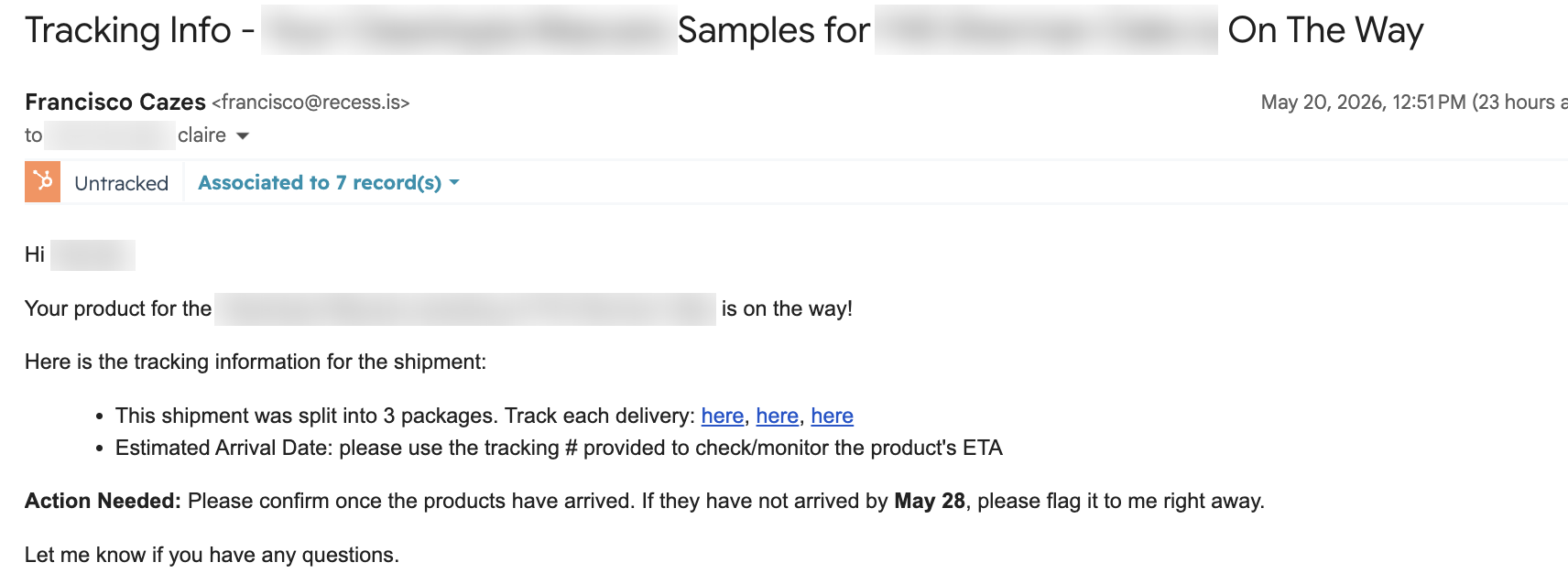
Note: Some shipments are split into multiple packages, each with its own tracking link. If you see more than one “here” link in the email, make sure to track each package separately.
Hosting multiple brands? You will receive a separate tracking email for each brand shipping to your venue. Track each one individually.
Can’t find your tracking email?
If the tracking email isn’t in your inbox (check your spam folder first), reach out to one of the following:
- Claire — claire@recess.is
- Francisco — francisco@recess.is
- The Recess team — events@recess.is (use this if you’d like the full team to see your request)
What if my package never arrives?
If your product does not arrive by the estimated delivery date listed in your tracking email, please flag it to your Account Support Specialist (Claire or Francisco) right away. Quick communication helps us resolve shipping issues before they affect your event.